Laser Engraving with AI: How to Design with Claude (MCP)
Published: June 25, 2026
Lùmen — now with AI design
Design your laser jobs by describing them to Claude. Lùmen is a native macOS GRBL controller with image engraving, SVG cutting, a built-in shape & text editor, and a local MCP server for AI assistants. €19.99 one-time, no subscription. 3-day free trial.
For the first time, you can design a laser engraving job by simply describing it. Ask an AI assistant for “a 60 mm circle with the text 2026 centered inside, and a rectangular frame around it” and watch the shapes appear on the canvas, ready to engrave. Lùmen makes this possible with a built-in MCP server that connects to Claude and other AI assistants — while keeping every physical action firmly in your hands.
What Is MCP, and Why Does It Matter for a Laser?
MCP — the Model Context Protocol — is an open standard that lets AI assistants interact with applications through a defined set of tools. Instead of just chatting, the assistant can take real actions inside an app that exposes an MCP server.
Lùmen exposes one such server. That turns a conversation into a design: you describe what you want, and the assistant calls Lùmen's tools to build it on the canvas as real, editable items — the same rectangles, ellipses, text, and layers you'd create by hand. It's the difference between explaining a layout and watching it take shape while you talk.
What the AI Can Do
Through MCP, an assistant like Claude can read your project and prepare a design:
- Add artwork — rectangles, ellipses, lines, polygons, and multi-line text, placed at exact millimeter coordinates.
- Import files — bring in an image to engrave or an SVG to cut, from a file path on your Mac.
- Lay it out — duplicate, align, distribute, replicate into a grid, center the design, or fit it to the work area.
- Set materials — apply a built-in material preset (wood, leather, acrylic…) so power and speed are right for the job.
- See its work — take a screenshot of the work area, rendered with the grid, origin, engrave-blue and cut-red layers, and the laser head when connected. The assistant gets back an image and can adjust based on what it sees.
- Check before you burn — validate the design and flag problems: a cut that falls outside the reachable area, a custom origin that isn't set, or artwork that spills past the work area.
What the AI Cannot Do (On Purpose)
This is the most important part. Lùmen's AI scope is strictly read and design. There is deliberately no tool that:
- moves the laser head or jogs the machine,
- runs a homing cycle,
- sets the work origin,
- traces the frame,
- starts, pauses, or stops a job,
- or fires the laser — even the low-power pointer.
An assistant can compose your artwork and inspect the machine's state, but it can never command the physical machine. You review the result on the canvas, frame it yourself, and start the job behind the same 5-second countdown as always. The AI is a designer at your side, not a hand on the controls.
Private by Default
The MCP server is built to be safe and unobtrusive:
- Off until you turn it on — nothing listens until you enable AI control in Settings.
- Loopback only — it binds to
127.0.0.1, your own Mac. It's not reachable from the network. - Licensed feature — available to licensed users, not during the trial.
How to Set It Up with Claude
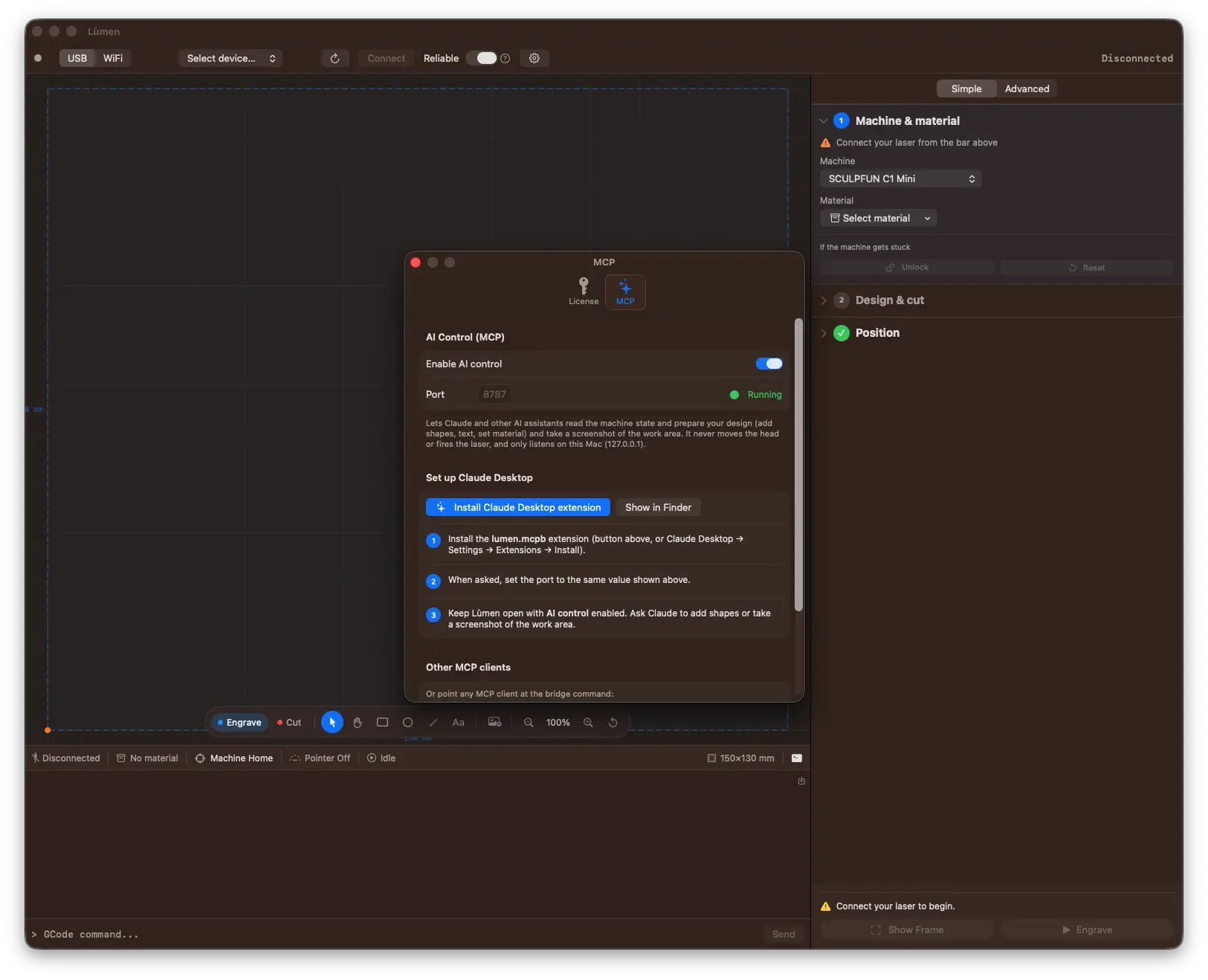
- In Lùmen, open Settings → MCP and turn on Enable AI control. You'll see the status switch to Running on the chosen port.
- Click Install Claude Desktop extension — it installs the bundled
lumen.mcpbextension into Claude Desktop in one click. (You can also install it from Claude Desktop → Settings → Extensions.) - When asked, set the port to the same value shown in Lùmen.
- Keep Lùmen open with AI control enabled, then ask Claude to add shapes or take a screenshot of the work area.
Prefer the command line? The same MCP tab shows a copy-ready command so you can point Claude Code — or any other MCP client — at Lùmen's bridge directly.
A Few Things to Try
- “Add the text ‘Hand made’ in a script font, 18 mm tall, centered in the work area.”
- “Create a 5×5 grid of 10 mm squares with 4 mm spacing.”
- “Set the material to Plywood, then take a screenshot so I can check the layout.”
- “Validate the design — is anything outside the work area?”
Want the full picture of what's possible? See what you can do with Claude in Lùmen — the ideas, workflows, and ready-to-copy prompts, from batch grids to engraving a photo from your clipboard.
Get Started
Lùmen is a native macOS laser controller with USB and WiFi connectivity, image engraving with 7 dithering algorithms, SVG cutting, a built-in shape & text editor, 18 material presets, a guided Simple mode, and an MCP server so Claude can help you design. It's a one-time €19.99 purchase with a 3-day free trial — no subscription.