We use cookies to improve your experience. By using this site you agree to our Privacy Policy.
Everything Lùmen Can Do
A deep dive into every feature of the most complete GRBL laser controller for Mac
From a built-in shape and text editor with multi-selection, alignment, QR codes and a bed alignment grid to image engraving with 7 dithering algorithms, SVG vector cutting, multi-item layers, 18 material presets, and real-time overrides — Lùmen gives you full control over your laser engraver.
1
Real-Time Preview & Positioning
Before you fire the laser, Lùmen shows you exactly what will happen. The interactive 2D canvas displays your entire job with zoom and pan, the machine's real work area in millimeters, and the current laser position.
Color-coded layers — blue for the engrave layer, red for the cut layer. Both are visible at once and you can tell what burns from what cuts at a glance.
Drag & drop positioning — move and resize layers and individual items directly on the canvas, or type precise X, Y, width, height, and rotation angle in millimeters and degrees.
Aspect ratio lock — hold Shift on a corner handle to keep the original aspect ratio while resizing.
Zoom and pan — scroll to zoom, drag to pan. Works just like any Mac design tool.
Framing
The Frame command traces the exact boundary of your job before engraving — so you can verify placement without burning anything. With the laser pointer active, the machine moves at low power (S10) to draw a visible outline on your material. With the pointer off, it traces the boundary with rapid moves.
Framing respects work area limits in Machine Home mode, preventing end-stop alarms.
2
Simple & Advanced Modes
Lùmen meets you where you are. A segmented control at the top of the sidebar switches the right pane between two layouts that drive the exact same engine — pick the depth you want. Your choice is remembered between sessions.
Simple — a guided five-step flow
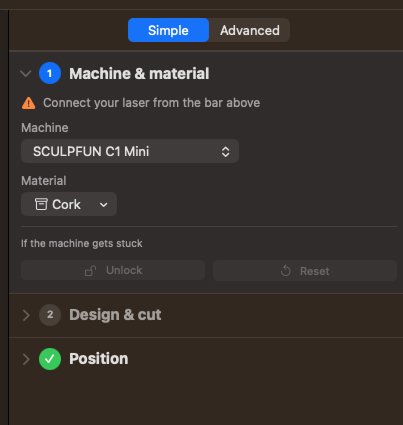
New to laser engraving, or just want to get a job out fast? Simple mode lays the workflow out as five numbered steps — Machine & material, Design & cut, Position, Frame, and Engrave. Each step shows whether it's done, current, or still to do, and the current one expands automatically — so you always know what to do next, without hunting through panels.
Advanced — the full cockpit
Flip to Advanced for the complete set of collapsible sections: machine status, real-time overrides, job controls, material presets, layers, machine settings, and jog. Everything is one click away, nothing is hidden.
Both modes share the same canvas, toolbar, connection bar, and status strip — switching is instant and your work never changes. Simple is the default, so first-timers get the guided path out of the box.
3
Claude & AI Integration (MCP)
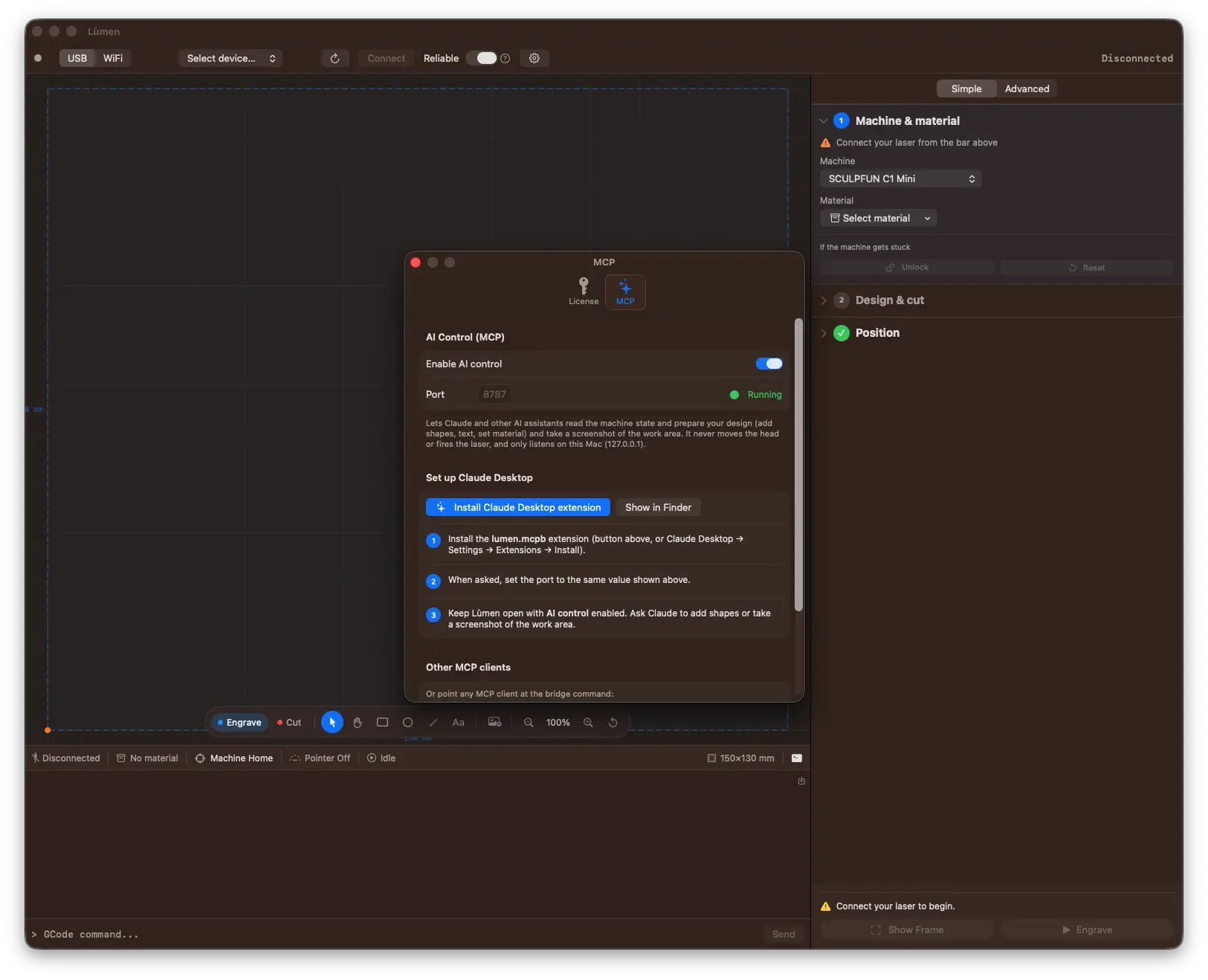
Lùmen is the first Mac laser controller you can drive with an AI assistant. It runs a local Model Context Protocol (MCP) server, so Claude — or any MCP-capable client — can read your project and build a design in plain language, right on the canvas.
Design by describing it
Ask in natural language — “add a 60 mm circle with the text 2026 centered, then put a rectangular frame around everything” — and the shapes, text, and layout appear on the canvas as real, editable items. The assistant can add rectangles, ellipses, lines, polygons, and multi-line text, import an image to engrave or an SVG to cut, set a material preset, then duplicate, align, distribute, array into a grid, center, and fit the design to the work area.
It can see what it made
A screenshot tool renders the work area — grid, origin, layers in engrave-blue and cut-red, and the laser head when connected — and hands it back to the assistant as an image. So the AI can look at the layout, check it against what you asked for, and adjust. A validate-design tool flags problems before you run the job: cut out of bounds, custom origin not set, or artwork outside the work area.
It designs, it never drives — by design
The AI's scope is strictly read and design. There is no tool that moves the head, homes the machine, sets the origin, frames, starts a job, or fires the laser. An assistant can compose artwork and inspect state; everything physical stays in your hands, behind the same buttons and the same 5-second countdown as always.
Private, and off by default
The server is off until you turn it on, listens only on your own Mac (127.0.0.1), and is a licensed feature. Setup is one click: open Settings → MCP, enable AI control, and install the bundled Claude Desktop extension — or point any MCP client at the bridge command shown there. Works with Claude Desktop and Claude Code today.
4
Built-in Shape & Text Editor
Lùmen isn't just a sender — it's also an editor. Draw rectangles, ellipses, lines, polylines, and multi-line text directly on the canvas, no Inkscape or Illustrator needed for simple jobs.
Five drawing tools
A floating toolbar on the canvas offers five tools:
Select — click an item, drag to move, use the handles to resize or rotate.
Rectangle / Ellipse — click and drag to draw. Hold Shift to constrain to a perfect square or circle.
Line / Polyline — each click drops a vertex; click the first vertex (with the green snap indicator) to close as a polygon, double-click or Enter to finish as an open polyline, Esc cancels.
Text — click to place a placeholder; the layer panel takes over for editing content, font, width & style variants, font size (in mm), alignment (left / center / right), and multi-line text.
After committing a shape, the tool auto-switches back to Select — you can immediately move it or tweak its parameters without an extra click.
Short of room on a small screen? The toolbar folds into a small knob that still shows the active tool, and you can drag it to whichever corner of the canvas is out of your way.
Smart resize and rotation handles
Selected shapes show 9 handles: 4 corners, 4 edge midpoints, and a green rotation handle above the top edge. Resize is anchor-locked: the opposite corner stays visually fixed even when the shape is rotated. The math projects the cursor through the shape's unrotated frame and recomputes the bounds so the visual anchor never drifts — exactly like in pro design tools.
Each object has its own aspect-ratio link beside its W / H fields: on by default for images and imported drawings, off for drawn shapes. Corner handles follow it; hold Shift to flip it for one drag.
Text resizes with its handles too: dragging a corner scales the font size, so the lettering never stretches and the size stays one number you can read and type.
Intensity instead of colors (Engrave only)
On the Engrave layer every item has two intensity sliders: Fill and Stroke, from 0 to 100%. Intensity is also a multiplier on the layer's laser power: a rectangle with 50% fill burns at half the configured power for the Engrave layer.
Each layer has its own identifying color on the canvas: blue for Engrave (matching the rasterized toolpath), red for Cut (matching the imported SVG). The blue alpha tracks intensity: solid blue = full burn, transparent blue = reduced power. You can tell what does what at a glance.
On the Cut layer, shapes are always stroke-only (filling an area to cut it makes no sense) and per-item intensity is hidden: the layer's power / feed / passes govern every cut. Shapes added to Cut are automatically coerced to stroke-only, and you can still select them by clicking inside the outline — not just on the edge.
Precise position, size, rotation
The X, Y, W, H, and ∠ fields in the layer panel accept exact numeric values in millimeters and degrees. Shapes can be rotated by an exact value (e.g. 45°), moved to precise coordinates, resized to exact millimeters — no dragging required. Every change reflects instantly on the canvas.
The engrave image can now be rotated too: a green rotation handle appears when the engrave layer is selected. The rotation is baked into the G-code the laser will execute — not just a visual effect.
An object list with the operation on each row
The layer panel lists your objects in the order the machine runs them — engrave, then score, then cut — and every row carries its operation as a pill. For a drawn shape that pill is a menu: move a rectangle from Engrave to Cut or Score, and back. Sent to Cut, a filled shape is cut along its outline; brought back to Engrave, it is filled again with the same intensity — nothing you set is lost on the way. Right-click works too, for a whole selection at once.
Multi-line text works exactly as you'd expect: there's a multi-line editor in the panel, press Enter for a new line, the text is laid out with the font's natural leading via CoreText.
Select many, act once
Drag a rectangle across empty canvas to select everything it touches, Shift- or ⌘-click to add or remove one object, ⌘A for all. A group moves together, resizes proportionally from its corners (so rotated objects and text never distort), and has its own X / Y / W / H fields. Every group action is a single ⌘Z.
Align and space
Align left, centre, right, top, middle or bottom — to each other, or to the bed when you work in Machine Home. Distribute three or more objects with equal gaps, or line them up with an exact gap in millimetres: the way to lay out parts for cutting with a known clearance. Alignment is measured on what each object actually draws — its rotated outline, a font's real letter shapes — not on an invisible box, so things that look aligned are aligned.
Cut, copy, paste, duplicate — and a right-click menu
⌘X ⌘C ⌘V ⌘D work on the canvas, and a copy pastes whole into another project: geometry, text, style, an image with its dithering settings. Each paste lands a step away from the last, so three pastes are three visible copies. Right-click an object for cut / copy / paste / duplicate / delete, select all, invert selection, operation, align and distribute.
Rulers and Fit to Scene
Millimetre rulers along the top and left edge, with the selection marked on both, and Fit to Scene (⌘9) to bring the bed and everything on it into view — including an object you left off the bed.
Pick any font, with width and style variants
Text items expose three pickers driven by every font installed on your Mac: Font (family), Width (Condensed / Compressed / Normal / Expanded …, shown only when the family has more than one), and Style (Regular / Bold / Italic / Bold Italic / …). Switch family and Lùmen preserves the current width + style if the new family supports them — e.g. going from Helvetica Condensed Bold Italic to Courier keeps Condensed Bold Italic when available, with graceful fallback otherwise.
Font size is a TextField + stepper combo: type an exact value in millimeters, or focus the stepper and use ↑ / ↓ to nudge by 1 mm.
Editable project files
Lùmen's v2 .gcode format includes a JSON block with every shape, geometry, style, and editable text. Reopen a project and find everything still editable — no flattening to curves or pixels. The file stays compatible with other senders that read only the plain G-code (it's saved as well, as a compatibility cache).
Bed alignment grid
File › Bed Alignment Grid lays a millimetre grid over the whole bed, every line numbered with its coordinate, plus diagonals, a centre circle and a title with your machine's name. Score it once on a sheet you leave on the bed: from then on, a part placed on X 40, Y 60 of the sheet is exactly where a design at X 40, Y 60 on the canvas lands — no more framing back and forth. Spacing, numbers and centre marks are editable, and the grid is a normal object: move it, resize it, or engrave it instead of scoring it.
Lock and reference objects
Lock an object (⇧⌘L) and the canvas lets clicks pass through it: it can't be moved, resized or deleted by accident until you unlock it. Mark it Reference only and it stays on screen, faded, but never burns — not in the job, the frame or the preview. Burn the bed grid once, then keep it as a locked reference under your layout.
5
QR Codes & Barcodes
Add a QR Code, Data Matrix, Aztec, PDF417, Code 128, Code 39, EAN-13 or UPC-A from the canvas toolbar and edit it in place. Codes are drawn as vector geometry, so they stay sharp at any size, engrave like any filled shape, and can be traced by a Score.
Content helpers — a link, a Wi-Fi network (name, password, security), a contact card, an email, a phone number or an SMS. Lùmen writes the format a phone camera acts on, so a café's Wi-Fi coaster or a business card needs no special syntax.
A check that it will scan — the code is rendered the way the laser will burn it, at your engrave resolution, and read back with the same barcode reader as the iPhone camera. If it may not scan, Lùmen tells you the width to make it before you burn the workpiece.
Invert for dark materials — on slate, anodised aluminium or charred wood the laser marks light; inverting burns the background so the code keeps the polarity a reader expects.
Retail codes done right — EAN-13 and UPC-A add their check digit (or tell you which one is wrong) and print the digits under the bars; the quiet zone a reader needs is part of the size.
QR error correction from L to H: higher survives a rough burn better.
6
Three Image Processing Modes
Lùmen converts your images to laser-ready G-code with three distinct processing modes, each suited to different materials and styles.
Dithering
Converts your image to black-and-white dots using error-diffusion algorithms. This is the gold standard for engraving photographs on wood, producing fine detail with excellent contrast. Choose from 7 algorithms:
Floyd-Steinberg — classic, balanced
Atkinson — high contrast, popular for laser
Burkes — smooth gradients
Jarvis-Judice-Ninke — wide diffusion
Sierra — detailed rendering
Sierra Lite — fast, lighter diffusion
Stucki — sharp edges
Grayscale Mapping
Maps continuous tones directly to laser power levels, producing smooth gradients. Best on materials that respond linearly to power changes, like anodized aluminum or slate.
Threshold
Binary conversion: every pixel becomes either fully burned or untouched. Adjustable threshold (0–255) lets you control the cutoff point. Ideal for high-contrast logos, text, and line art.
A preview that looks like the burn
The canvas draws the dithered image pixel for pixel, exactly as the laser will lay it down — so what you judge brightness and contrast on is what you'll get on the wood.
Brightness & Contrast
Both adjustable from −100 to +100 with instant preview. The interface shows your original image side by side with the processed result, so you can evaluate the output before generating G-code.
Supported Formats
PNG, JPEG, BMP, and TIFF.
7
SVG Vector Cutting
Load any SVG file for precise vector cutting. Lùmen's built-in SVG parser handles all standard elements and converts them to optimized G-code.
Full element support — paths with Bézier curves, rectangles, circles, ellipses, lines, polylines, and polygons.
Nested transformations — rotation, scale, and translation are resolved correctly, even when deeply nested.
Independent parameters — speed, power, and number of passes (1–20) are set separately from the engrave layer.
M3 constant power mode — ensures clean, uniform cuts at consistent depth, regardless of speed changes during acceleration and deceleration.
Curves are automatically converted to linear segments for G-code. The cut layer appears in red on the canvas, clearly separated from the blue engrave layer.
8
Multi-item Dual Layer System
Combine engraving and cutting in a single job. Lùmen's two-layer system lets you engrave a design and cut its outline without repositioning your material — and each layer can hold any number of items: shapes, text, the imported image, the SVG.
Engrave layer — raster images, drawn shapes, and text processed with M4 dynamic power mode for optimal gradient reproduction.
Cut layer — SVG vector paths and stroke-only shapes processed with M3 constant power mode for clean, consistent cuts.
Independent positioning and sizing — each layer has its own X, Y, width, height, and rotation. Move and resize them separately on the canvas or via numeric fields.
Two-level layer tree — expand a layer to see every item inside, like in Photoshop or Figma. The + menu adds images, G-code, SVG, or activates a drawing tool to place new shapes.
Sequential execution — engrave runs first, then cut. This order prevents cut pieces from shifting during engraving.
Use one or both — start a job with just an image, just an SVG, just shapes, or any combination.
9
Precise Parameter Control
No guesswork. Every parameter is adjustable via dedicated sliders, and the preview updates in real time as you make changes.
Parameter
Range
Resolution
1–20 lines/mm
Speed (Feed Rate)
100 mm/min up to machine maximum
Power Max
1–100% (auto-scaled to machine $30 value)
Power Min
0–100%
Overscan
0–20 mm
Brightness
−100 to +100
Contrast
−100 to +100
Threshold
0–255
Real-Time Overrides
During a running job, you can adjust feed rate and laser power without pausing. Controls allow ±1% and ±10% adjustments, or a reset to 100%. Changes apply instantly through GRBL's real-time command protocol.
10
18 Material Presets
Ready-to-use presets for the most common laser engraving and cutting materials. Select a preset and all parameters — speed, power max, power min, resolution, and passes — are set automatically.
Engraving Presets
Kraft Paper
White Paper
Cardboard
Plywood
Solid Wood
Bamboo
Aluminum Foil
Cork
Leather
Silica Gel
Felt
Tin Sheet
Acrylic
ABS / Plastic
Marking Spray on Metal
Cutting Presets
Paper Cut (1 pass)
Plywood 3 mm (5 passes)
Balsa 2 mm (3 passes)
Adapted to your laser
The presets were measured on a 3 W diode laser. Your machine preset tells Lùmen your laser's power, and every material is adapted to it before it is applied, so it puts down the same energy per millimetre: engraving and Score change the power first, then the speed; a cut keeps its power and changes the passes, then the speed. The picker shows the adapted numbers and says which laser they were measured on — an estimate, which the test grid below confirms on your material. A material you save remembers the laser you tuned it on.
Custom Presets
Found the perfect settings for a material? Save them as a custom preset. Create, edit, rename, and delete your own presets — they persist across sessions and are always one click away in the dropdown menu.
11
Power/Speed Test Grid
The fastest way to find optimal settings for a new material. Lùmen generates a calibration grid where each cell is engraved at a different combination of speed and power, so you can visually identify the best parameters.
Sized to your machine — the power range starts from your controller's own maximum ($30), and with your laser's power known the ranges move so every square gets the energy it would on a 3 W laser — instead of a grid charred black on a 20 W one.
Configurable steps — 2 to 10 steps for both speed and power axes.
Adjustable cell size and spacing — fit the grid to your material sample.
Resolution control — match the resolution you plan to use for the final job.
Preview with axis labels — see the grid layout and all speed/power values before generating G-code.
Run the test, pick the cell that looks best, and apply those parameters to your job.
12
Flexible Work Origin
Two modes for positioning your work, depending on your setup and workflow.
Machine Home Mode
Uses the machine's limit switches to establish a repeatable zero position. Work area limits are enforced automatically — Lùmen prevents movements and G-code coordinates from exceeding the physical boundaries, avoiding hard-limit alarms.
Custom Origin Mode
Jog the laser to any position and press Set Zero Here. Custom origin is fully WYSIWYG: the canvas crosshair is your zero point, and whatever you place relative to it engraves and cuts exactly there — no anchor or alignment guesswork. Custom origin is even saved in the project and restored automatically when you reopen it.
Jog Controls
8-direction jog pad with configurable step size in millimeters. The laser pointer toggles a low-power visible dot (about 1 % of full power) so you can see exactly where the focus point is without burning your material.
A machine that sits turned on your table
Some engravers are used from the side — an Artilume T1 faced from its arm, for one — and then ↑ moves the head sideways. Press ↻ beside the jog pad: each click turns the machine a quarter, the bed on the canvas turns with it and the arrows follow, so pressing ↑ again is the test. The engraving lands where the canvas shows it, and the orientation is remembered for each machine. A mirrored machine, which no turn can fix, has its own switch in Advanced › Machine. How to tell a turn from a mirror →
13
Connection, Streaming & Recovery
Lùmen implements the GRBL character-counting streaming protocol with precise 127-byte buffer tracking. Every command is tracked from send to acknowledgment, preventing buffer overflows and keeping raster motion smooth.
USB or WiFi
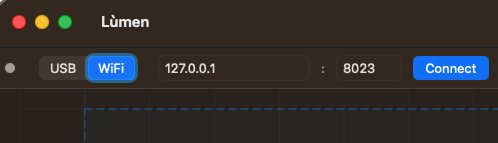
Connect over USB or, new in 2.0, over WiFi. Network-capable controllers — ESP32 / ESP3D-class boards such as the Algolaser Pixie — expose the same GRBL command stream over a raw TCP socket: pick WiFi, enter the machine's IP and port, and connect. Because only the transport changes, every feature works identically on either link.
Reliable mode
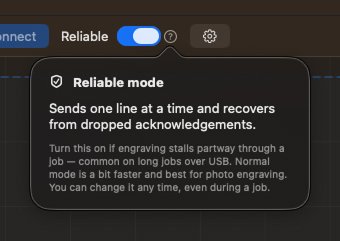
Some long jobs over USB stall partway through when an acknowledgement is lost on the cable — common on no-flow-control USB-CDC links. Turn on Reliable and Lùmen sends one line at a time and safely recovers from a dropped ack, so the job runs to the end. Normal mode is a touch faster and best for photo engraving; you can switch any time, even mid-job.
Stall warning
If the machine goes silent mid-job with commands still pending, Lùmen surfaces a clear “Job stalled” warning, so you're never left guessing in front of a hung job. It's informational — it never blindly drains the buffer (which would overflow the controller); you decide whether to stop and resume.
Resume from Position
Stopped mid-job? Resume from the exact G-code line where you left off with the Resume button. No need to start the entire job over.
Color-Coded Serial Console
The built-in console shows all serial communication in real time:
Blue — commands sent to the machine
Black — responses from the machine
Grey — status reports
Red — errors and alarms
Type G-code commands manually, navigate command history with arrow keys, and export the full log as a text file for debugging or support.
14
Editable Project Files
Save your entire job — both layers, every shape and text item, all settings, positions, sizes, and rotations — into a single .gcode file in Lùmen's v2 native format.
Every item stays editable — rectangles, ellipses, lines, polygons, and text are stored as JSON geometry, not flattened to curves or pixels. Reopen and tweak any item without losing precision.
Complete state preservation — engrave G-code, cut SVG data, positions, dimensions, rotations, intensity, and every parameter are saved and restored exactly.
SVG preserved as base64 — the original SVG data is embedded in the project file, so you can resize and re-edit the cut layer after reopening.
Compatible with other senders — project files include standard G-code that any generic G-code sender can execute, even without Lùmen-specific features. Old projects load cleanly in the new version.
15
Presets for 20 Machines
Built-in presets for the most popular GRBL laser engravers, each listed once for every laser power it is sold with — SCULPFUN C1 Mini · 3 W and · 6 W, Artilume T1 · 3, 7 and 12 W. A preset sets the work area, the maximum speed and power values, and your laser's optical power: the one number the controller can't report, and the one the material presets are adapted to. The first time you open Lùmen, it asks which laser you have.
SCULPFUN
S30, S10, S9, S6, C1 Mini, SF-A9
Ortur
Laser Master 3, LM2 Pro S2, LM2
Atomstack
A20, X20, S10, A5 Pro
TwoTrees
TS2, TTS-55
NEJE
3 Max, 3 Pro, Master 2S Plus
Artilume
T1
FOKOOS
FE10
Custom
Any GRBL machine with USB
Don't see your machine? Create a custom preset with your work area, max values and laser power — the optical output, not the electrical rating: a “40 W” listing is often a 5.5 W laser. Custom presets are saved permanently and editable at any time. When you connect, Lùmen reads the bed size from the controller and tells you if it doesn't match the built-in machine you've selected.
16
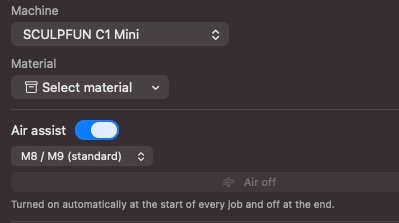
Air Assist
A jet of air on the cutting point clears smoke and debris out of the beam's way — cleaner edges, less charring, a lens that stays clean. If your controller switches an air pump, Lùmen now switches it with the job.
Turn Air assist on once in Machine settings and every job sends the on-command before the first move and M9 at the end. No more typing M8 in the console before each cut — and no more compressor left running because you forgot the M9.
Nothing is sent until you say the pump exists.M8 is compiled into every stock GRBL build, but a board with no coolant support answers it with error:20 in the middle of a job. So air assist is off by default, and while it's off Lùmen emits exactly the G-code it always did. Firmware built for mist coolant can pick M7 / M9 instead.
A manual Air button — blow debris off a piece between jobs, and check your board answers the command at all before finding out halfway through a cut.
In the exported file too. A job run from the machine's own SD card through Export G-code (offline) carries the same on and off commands as one streamed from the Mac.
Survives a resume. Stop a job, resume it, and the pump comes back on along with the laser mode and the work offset. The rest of the cut never runs dry.
Yours, not the machine preset's. Whether a pump is wired up is per-owner, so changing machine preset never silently turns air assist on or off.
Visible while you work — an Air On / Air Off indicator appears in the status strip, but only for machines that have a pump.
17
Rotary Attachment
A rotary turns the Y axis from travel into rotation: instead of the head moving up the bed, the workpiece turns underneath it and the engraving wraps around a tumbler, a bottle, a pen or a rolling pin. On a GRBL machine that is a handful of controller settings — and those settings live in the controller's memory, where they outlive the app. That is the whole risk of a rotary, and what Lùmen is built around.
Two numbers, not a calculation. Enter the mm per rotation and roller diameter your rotary's manual quotes — the same two fields every setup video walks through. Lùmen works the Y scale out from them and your machine's own flat calibration, which it reads off the controller the moment you connect. Motor steps, microstepping and gear ratios stay out of it.
Rollers or chuck. On rollers the scale comes from the rollers, so it holds for every object you put on them. In a chuck it comes from the workpiece — which is why a fixed pair of values is right for exactly one object, and why Lùmen computes it per job. Enter the object as a diameter or as a circumference: a mug gets a caliper across it, a tube gets a tape around it.
The bed is always one click away. Your flat calibration is captured before anything is overwritten, stays visible in the setup, and goes back with one button. A machine left in rotary stretches every later flat job in Y, silently and with Lùmen not even running — so the way back is the part that matters most.
The machine is the authority. Lùmen re-reads the settings after writing them, so the mode is verified rather than assumed, and reconciles its own belief against the controller at every connection. If someone changed the calibration behind its back, it says so and offers both ways out instead of guessing.
No homing, ever. In rotary the Y axis turns your workpiece, so a homing cycle would spin it against a switch that isn't there. Homing is refused while rotary is on — and because Lùmen cannot see whether a rotary is bolted on, it asks before any homing that would otherwise happen as a side effect of Start or Frame.
Centre the design on the zero. The zero is the crest of the object, the one line where the beam arrives perpendicular and in focus, so a design belongs astride it rather than climbing away from it. One button moves the whole design there — and because the geometry really moves, the canvas keeps showing exactly where the engraving will land.
Turn it once before you burn. A one-full-turn test rotates the workpiece with the laser off: mark the object, run it, and see whether the mark comes back to where it started. The calibration is checked on purpose, not discovered mid-job.
Lasers are powerful tools. Lùmen includes multiple safety layers to prevent accidents and protect your machine.
5-second countdown before every job starts, with cancel option. Gives you time to put on safety glasses and verify placement.
Automatic laser-off — the laser pointer is turned off before job start, and the laser is shut down (M5, S0) at job completion or stop.
Work area limits — in Machine Home mode, G-code coordinates are clamped to the physical work area, preventing hard-limit alarms.
Overscan clamping — overscan is dynamically reduced when the image is near work area edges, preventing negative coordinates that would trigger ALARM:1 errors.
Jog limits — jog controls are disabled while the machine is moving and movements are clamped to the work area boundaries.
Alarm detection — GRBL alarm codes are detected and displayed with human-readable descriptions (hard limit triggered, homing failure, etc.).
Try Lùmen Free for 3 Days
No credit card required. One-time purchase. No subscription.