Affordable LightBurn Alternatives for GRBL Lasers
Published: April 7, 2026 · Updated: August 29, 2026
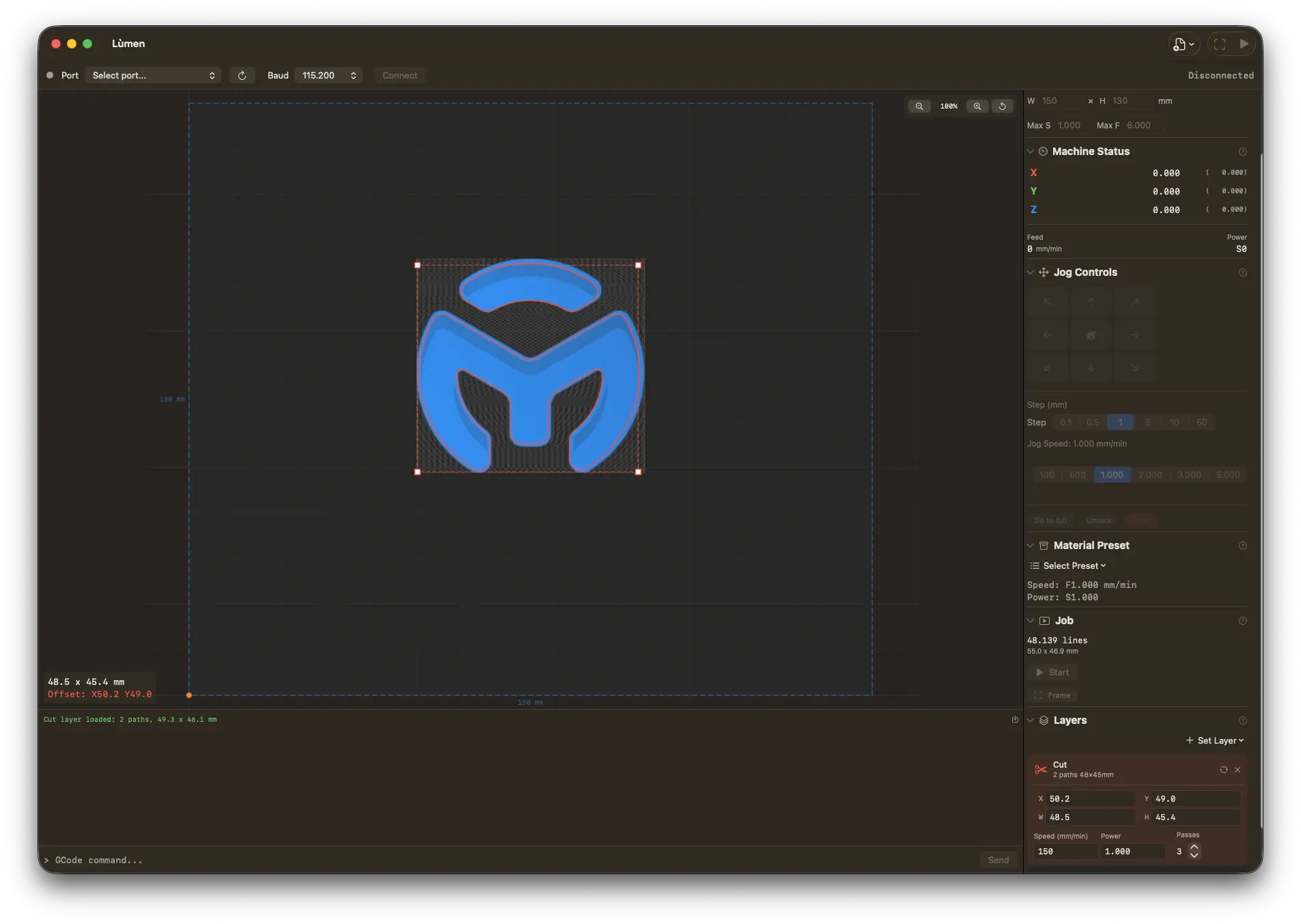
Lùmen — the LightBurn alternative for Mac
Native macOS controller for GRBL diode lasers: image engraving with 7 dithering algorithms, SVG cutting, dual-layer workflow, and presets for Sculpfun, Ortur, Atomstack, TwoTrees, NEJE. €19.99 one-time, no subscription. 3-day free trial.
Why People Look for LightBurn Alternatives
LightBurn has been the gold standard for laser engraver software for years, and for good reason. But its higher price and move to paid annual update renewals have pushed many hobbyists to explore alternatives.
Under the current pricing, the Core license (for GRBL and Marlin machines) is a one-time $99, with a higher-priced Pro tier for DSP controllers (Ruida or Trocen, CO2 lasers). It is still a perpetual license — the software keeps working forever — but it now includes only a year of updates; staying on the latest version afterward requires a paid renewal. That switch from lifetime updates to annual renewals was met with significant pushback from the community.
For hobbyists who own a single GRBL-based diode laser and use it on weekends, paying $99 up front — and again to keep updates coming each year — can feel excessive. Many of these users only need the basics: importing an image, choosing a dithering algorithm, and sending GCode to their machine. They might do some simple SVG cutting on the side. Paying for advanced features they never touch is hard to justify.
That said, LightBurn remains the most capable option for professional and advanced users. Before looking at alternatives, it is worth understanding what makes it so popular.
What Makes LightBurn Great
Let's be fair: LightBurn earned its reputation. It is a genuinely excellent piece of software, and for many users it is still the right choice.
- Broad controller support — LightBurn works with GRBL, Ruida, Trocen, Marlin, and other controllers. If you have a CO2 laser with a Ruida panel, LightBurn is essentially your only serious option.
- Camera alignment — Built-in support for USB cameras lets you align your workpiece visually and position designs with precision.
- Rotary support — Need to engrave a tumbler or a cylindrical object? LightBurn handles rotary axis configuration out of the box.
- Advanced vector editing — You can design directly inside LightBurn with node editing, Boolean operations, and offset tools. It is not a full replacement for Illustrator or Inkscape, but it covers a lot of ground.
- Cross-platform — Available on macOS, Windows, and Linux.
- Documentation and community — LightBurn has excellent official documentation, active forums, and a large user base that shares tips and settings.
If you own a CO2 laser, work across multiple operating systems, or rely on camera alignment and rotary features, LightBurn is hard to beat at any price. The price and update renewals are easier to stomach when you are using the software professionally or depend on its full feature set.
Free Alternatives
Several free options exist, though each comes with trade-offs. Here is an honest look at the most common ones.
LaserGRBL (Windows only)
LaserGRBL is the most popular free laser engraving software. It is open-source, well-maintained, and has a solid community behind it. For basic image engraving on Windows, it gets the job done.
The main limitations: it only runs on Windows (no Mac, no Linux), it has no SVG cutting support, and the user interface feels dated. It also lacks advanced features like layer management or project files. But if you are on Windows and just want to engrave photos onto wood, LaserGRBL is the go-to free option. If you are on a Mac and looking for a LaserGRBL replacement specifically, see our dedicated LaserGRBL alternatives for Mac guide.
LaserWeb (Cross-platform)
LaserWeb is a browser-based, open-source tool that runs on any platform. It supports both raster engraving and vector cutting, and works with GRBL, Marlin, and Smoothieware controllers.
The downsides are significant: the setup process involves running a local server, the project is not actively maintained, and the interface can be overwhelming for beginners. If you are technically inclined and willing to invest time in configuration, LaserWeb is capable. But it is not something most hobbyists would describe as user-friendly.
Universal Gcode Sender (Cross-platform)
UGS (Universal Gcode Sender) is a Java-based CNC controller that works on Mac, Windows, and Linux. It can send GCode to any GRBL machine, including laser engravers.
However, UGS is a CNC sender, not a laser-specific tool. It has no built-in image processing, no dithering algorithms, and no raster engraving pipeline. You would need to generate your GCode in another application and then use UGS purely as a sender. For laser users, it works in a pinch but is not a complete solution.
K40 Whisperer (K40 CO2 lasers only)
K40 Whisperer is a free tool designed specifically for the cheap K40 CO2 laser cutters that use a Lhystudios (M2 Nano) controller board. If you have a K40, it is an essential tool. If you have anything else, it will not work with your machine.
Paid Alternatives
Lùmen (macOS, one-time €19.99)
Lùmen is a native macOS application built specifically for GRBL-based diode lasers. It takes a focused approach: instead of trying to support every controller and every platform, it does one thing well — controlling GRBL lasers from a Mac.
Key features include:
- 7 dithering algorithms — Floyd-Steinberg, Atkinson, Burkes, Jarvis-Judice-Ninke, Sierra, Sierra Lite, and Stucki. Atkinson is particularly popular for laser engraving due to its high-contrast output.
- SVG cutting — Import SVG files for vector cutting with adjustable power, speed, and number of passes.
- Built-in shape and text editor — Draw rectangles, ellipses, lines, and multi-line text straight on the canvas with any font installed on your Mac, and set size and rotation numerically in millimetres. Select several objects to move, align or space them, copy and paste between projects, add QR codes and barcodes that Lùmen checks will scan, and lock objects or keep them as references that never burn — like a numbered bed grid burnt once on a sheet. Simple jobs never need Inkscape or Illustrator.
- Object list with operations — Every shape, text, image, code and SVG in the order the machine runs them, each with its operation (engrave, score, cut) on a pill you can change: a drawn shape moves from engrave to cut and back without losing its fill.
- Design with Claude — A local MCP server lets Claude Desktop or Claude Code build a design in plain language: shapes, text, imported images, alignment, material presets. It is design-only — the AI never moves the head, homes, or fires the laser.
- USB or WiFi — The same GRBL command stream over a cable or over the network (GRBL-over-TCP) for ESP32/ESP3D-class controllers.
- Simple and Advanced sidebars — A five-step guided flow for a first job, or a full cockpit when you know what you want. Same engine, switch any time.
- Reliable streaming and resume — For long jobs that stall on flaky USB links, Reliable mode sends one line at a time and recovers a dropped acknowledgement; after a stop you can resume from the exact G-code line.
- Air assist — If your controller switches an air pump, Lùmen switches it with the job: on before the first move, off at the end, in streamed and exported jobs alike.
- Device presets — Built-in profiles for popular machines from Sculpfun, Ortur, Atomstack, TwoTrees, and NEJE. Custom presets can be saved as well.
- 18 material presets — Pre-configured power and speed settings for wood, leather, paper, acrylic, and more, plus a power/speed test grid generator to dial in your own.
- Editable project files — The native
.gcodev2 format embeds every shape, text, and style as JSON, so a reopened project is still editable item by item — nothing is flattened, and generic G-code senders still read the file. - Native SwiftUI interface — Feels like a proper Mac app, not a cross-platform port.
The price is €19.99 one-time, with free updates for life — no subscription, no renewal fees. That is a fraction of what a LightBurn license costs up front.
The trade-offs are clear: Lùmen only works on macOS, and it only supports GRBL controllers. There is no camera alignment, and the editor covers shapes, text and codes rather than node-level vector work like LightBurn's node editing and Boolean operations; and air assist runs per job rather than per layer. If those limitations match your setup — a Mac and a GRBL diode laser — it is an excellent value.
Download Lùmen and try it with your machine.
Vextrify (€149.99/year, or €249 one-time)
Vextrify is the newest name on this list: a production suite launched in 2026 that runs in the browser and as a native desktop app for macOS and Windows. It is also the most ambitious of the alternatives here. It drives GRBL diode lasers and CO2 machines with Ruida controllers — several at once from one computer — with camera alignment (lens calibration from ArUco markers), colour-coded layers in the LightBurn style, a rotary mode for cylindrical parts, material recipes, and preparation studios for photos, 3D relief, vectorising and QR codes that hand their result straight into the laser job. It also exports clean files for LightBurn, EZCAD or Ruida when a job belongs elsewhere.
Two things are worth knowing before comparing prices. The entry plan — Studio, €99.99 a year — is the online suite only and does not control a machine: driving a laser starts at Studio Pro, €149.99 a year, or Lifetime Pro at €249 once, which includes twelve months of the online studio and its AI credits. And the product is account-based: you sign up and work in a workspace, with the desktop app included in the paid tiers.
If you want one program that covers preparation and production across diode and CO2 machines, it is a serious piece of software and it is priced like one. If what you need is to put a photo on a piece of wood with the GRBL laser on your desk, it is a lot of suite for that job.
Lùmen vs Vextrify at a glance:
| Lùmen | Vextrify | |
|---|---|---|
| Cost to control a laser | €19.99 once | €149.99/year, or €249 once |
| Shape | A Mac app you install | Browser suite + desktop app |
| Account required | No | Yes |
| Machines | GRBL diode | GRBL diode + CO2/Ruida, several at once |
| Connection | USB or WiFi | USB |
| Camera alignment | No | Yes |
| Rotary | Yes | Yes |
| Design tools | Shapes, text, QR codes | Vectorise, 3D relief, AI images, QR |
| Updates | Free for life | While subscribed (12 months with Lifetime Pro) |
Comparison Table: LightBurn vs LaserGRBL vs Lùmen
| Feature | LightBurn | LaserGRBL | Lùmen |
|---|---|---|---|
| Price | $99 one-time (Core) | Free | €19.99 once |
| Platform | Mac, Windows, Linux | Windows | macOS |
| Controller Support | GRBL, Ruida, Trocen, Marlin | GRBL | GRBL |
| Image Engraving | Yes | Yes | Yes |
| Dithering Algorithms | Several | Several | 7 |
| SVG Cutting | Yes | No | Yes |
| Camera Alignment | Yes | No | No |
| Rotary Support | Yes | No | Yes (since 3.0) |
| Air Assist | Yes, per layer | Via custom G-code | Yes, per job |
| Built-in Design Tools | Yes (nodes, Boolean, offset) | No | Shapes, text, QR codes |
| Layer System | Yes (multi-layer) | No | Yes (engrave + cut/score operations) |
| Project Files | Yes | No | Yes |
| Native Mac App | No (cross-platform) | No | Yes (SwiftUI) |
When to Stick with LightBurn
LightBurn is worth the price if any of the following apply to you:
- You have a CO2 laser with a Ruida or Trocen controller. No alternative supports DSP controllers as well as LightBurn does. For most CO2 laser owners, it is the only realistic option.
- You need camera alignment. If you regularly position designs on irregularly shaped workpieces using a camera, LightBurn is the only software that offers this workflow.
- You need per-layer control. LightBurn assigns speed, power, passes and air assist layer by layer across as many layers as a job needs. Lùmen runs an engrave layer and a cut layer, and switches air assist per job rather than per layer.
- You work across multiple operating systems. LightBurn runs on Mac, Windows, and Linux with the same license. If you switch between machines, that flexibility matters.
- You need built-in vector design tools. LightBurn's node editor, Boolean operations, and offset tools let you design without switching to a separate vector editor.
In short, if laser engraving and cutting is a significant part of your workflow — whether professional or as a serious hobby — and you use the advanced features, it pays for itself.
When an Alternative Makes More Sense
On the other hand, an alternative is worth considering if:
- You have a GRBL-based diode laser. Machines from Sculpfun, Ortur, Atomstack, TwoTrees, NEJE, and similar brands all use GRBL. You do not need DSP support.
- You mostly do image engraving and simple cutting. If your typical workflow is importing a photo, applying a dithering algorithm, and sending it to the laser, you do not need LightBurn's full feature set.
- You are on a Mac and want a native experience. Cross-platform apps often feel foreign on macOS. A native SwiftUI app integrates with the system in ways that ported software cannot.
- Budget is a concern. A one-time payment of €19.99, with free updates for life, costs far less than LightBurn's $99+ up front plus paid renewals to stay current. You pay once and you are done.
- You are just getting started. If you bought your first diode laser and want to try engraving without committing to LightBurn's price, a cheaper or free option lets you learn the basics first.
The Bottom Line
LightBurn remains the most feature-rich laser software available. Its price makes sense for users who rely on its advanced capabilities daily. But not everyone needs everything LightBurn offers.
If you are a Mac user with a GRBL diode laser, Lùmen gives you image engraving with 7 dithering algorithms, SVG cutting, a dual layer system, and device presets for a one-time €19.99. No subscription, no recurring fees.
If you are on Windows, LaserGRBL is free and handles basic engraving well.
Pick the tool that matches your machine, your platform, and your budget. The best software is the one you will actually use.